> ## Documentation Index
> Fetch the complete documentation index at: https://docs.patched.codes/llms.txt
> Use this file to discover all available pages before exploring further.
# Running a Patchflow
> Use webhooks and GitHub actions to trigger patchflows
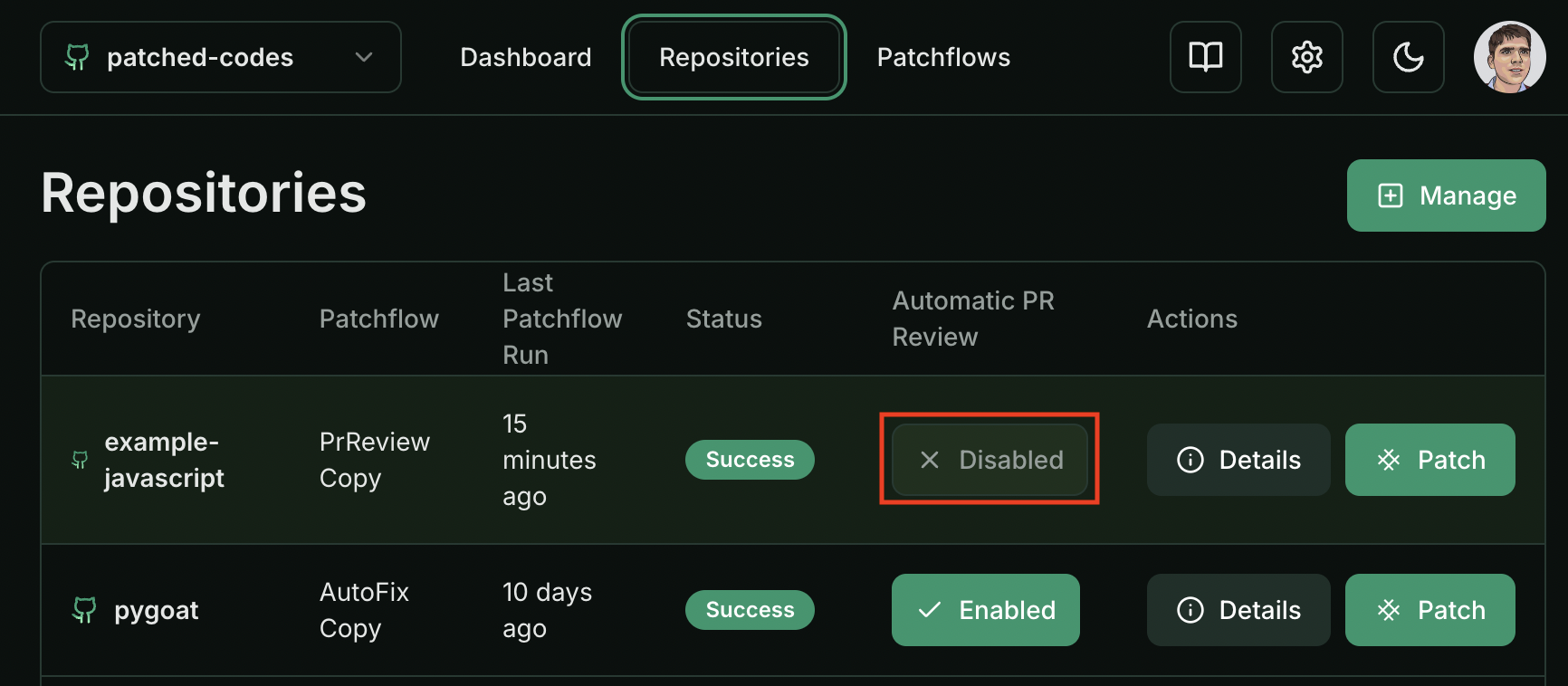 ## From the Patched Dashboard
1. Click the 'Patch' button next to the repository you'd like to patch.
2. In the pop-up modal, choose the patchflow you'd like to run. You can learn more about the patchflows [here](/patchflows/overview).
3. Fill in the patchflow specific input values as needed, and click 'Patch'.
4. If the patch was triggered successfully, you should see a toast notificaton on the bottom right.
## Using Patchwork CLI
1. Install the Patchwork CLI by running `pip install patchwork-cli`.
2. Navigate to the root folder of the code repository you want to patch.
3. Run `patchwork `. The default patchflows are `AutoFix`,`GenerateREADME`,`GenerateDocstring` and `PRReview`. You can learn more about the patchflows [here](/patchflows/overview).
Make sure you set the `PATCHED_API_KEY` environment variable with your API key before running the Patchwork CLI.
## Using GitHub Actions
You can also trigger patchflows from Github actions. The simplest way to do it is to run the Patchwork CLI as a step within your job.
For example, to trigger the PRReview patchflow on every pull request that is made to the main branch you can use something like this:
```yaml GitHub Action theme={null}
name: Patchwork PRReview
on:
pull_request:
branches: [main]
jobs:
review:
runs-on: ubuntu-latest
permissions:
pull-requests: write
steps:
- uses: jwalton/gh-find-current-pr@master
id: findPr
- name: PR Review
run: |
pip install patchwork-cli
patchwork PRReview --log debug \
--openai_api_key=${{ secrets.OPENAI_KEY }} \
--github_api_key=${{ github.token }} \
--pr_url=https://github.com/${{ github.repository }}/pull/${{ steps.findPr.outputs.number }}
```
## Using Gitlab CI
You can also trigger patchflows from Gitlab CI. The simplest way to do it is to run the Patchwork CLI as a step within your Gitlab CI yaml file.
For example, to trigger a review patchflow on every merge request that is made to the master branch you can use the script below:
```yaml Gitlab CI theme={null}
patched:
only:
- master
script:
- git remote set-url origin https://oauth2:$gitlab_api_key@$CI_SERVER_HOST/$CI_PROJECT_NAMESPACE/$CI_PROJECT_NAME.git
- pip install patchwork-cli
- patchwork PRReview --patched_api_key=$PATCHED_API_KEY --gitlab_api_key=$gitlab_api_key --pr_url=$CI_PROJECT_URL/-/merge_requests/$CI_MERGE_REQUEST_IID
```
## Using Webhooks
Coming Soon
## From the Patched Dashboard
1. Click the 'Patch' button next to the repository you'd like to patch.
2. In the pop-up modal, choose the patchflow you'd like to run. You can learn more about the patchflows [here](/patchflows/overview).
3. Fill in the patchflow specific input values as needed, and click 'Patch'.
4. If the patch was triggered successfully, you should see a toast notificaton on the bottom right.
## Using Patchwork CLI
1. Install the Patchwork CLI by running `pip install patchwork-cli`.
2. Navigate to the root folder of the code repository you want to patch.
3. Run `patchwork `. The default patchflows are `AutoFix`,`GenerateREADME`,`GenerateDocstring` and `PRReview`. You can learn more about the patchflows [here](/patchflows/overview).
Make sure you set the `PATCHED_API_KEY` environment variable with your API key before running the Patchwork CLI.
## Using GitHub Actions
You can also trigger patchflows from Github actions. The simplest way to do it is to run the Patchwork CLI as a step within your job.
For example, to trigger the PRReview patchflow on every pull request that is made to the main branch you can use something like this:
```yaml GitHub Action theme={null}
name: Patchwork PRReview
on:
pull_request:
branches: [main]
jobs:
review:
runs-on: ubuntu-latest
permissions:
pull-requests: write
steps:
- uses: jwalton/gh-find-current-pr@master
id: findPr
- name: PR Review
run: |
pip install patchwork-cli
patchwork PRReview --log debug \
--openai_api_key=${{ secrets.OPENAI_KEY }} \
--github_api_key=${{ github.token }} \
--pr_url=https://github.com/${{ github.repository }}/pull/${{ steps.findPr.outputs.number }}
```
## Using Gitlab CI
You can also trigger patchflows from Gitlab CI. The simplest way to do it is to run the Patchwork CLI as a step within your Gitlab CI yaml file.
For example, to trigger a review patchflow on every merge request that is made to the master branch you can use the script below:
```yaml Gitlab CI theme={null}
patched:
only:
- master
script:
- git remote set-url origin https://oauth2:$gitlab_api_key@$CI_SERVER_HOST/$CI_PROJECT_NAMESPACE/$CI_PROJECT_NAME.git
- pip install patchwork-cli
- patchwork PRReview --patched_api_key=$PATCHED_API_KEY --gitlab_api_key=$gitlab_api_key --pr_url=$CI_PROJECT_URL/-/merge_requests/$CI_MERGE_REQUEST_IID
```
## Using Webhooks
Coming Soon